A living, precise, traceable inventory, from the catalogue to the physical count.
A customer asks whether you still have a certain item. No more dashing to the stockroom to check: the exact quantity is on screen, and it updates by itself on every sale.
Products
Create, edit, delete
Image, price, quantity, description
Unique item number and unique name
Advanced search, filters and pagination
Purchase cost and calculated margin (restricted to managers)
Internal notes per product
Filter by price range
Categories
Hierarchical organisation of products
Image and description per category
A product can belong to several categories
Automatic product count
Inventory movements
Inbound and outbound with a mandatory reason
Traceability: user, date, reason
Optional batch number
Paginated, exportable history
Physical stocktake
Multi-product adjustment
Enter the actual count, the difference is calculated automatically
Movements generated to stay consistent
Reason and batch number
Expiry
Expiry date per product
Screen for products expiring soon
Filters of 7, 15, 30, 60, 90 days and more
Colour code by urgency
QR code and value
Product QR code for shelf identification
Total stock value calculated instantly
CSV export of the stock status
CSV export of movements with filters
Module 2
Point of sale (checkout)
A modern, fast, frictionless checkout, built for peak hours.
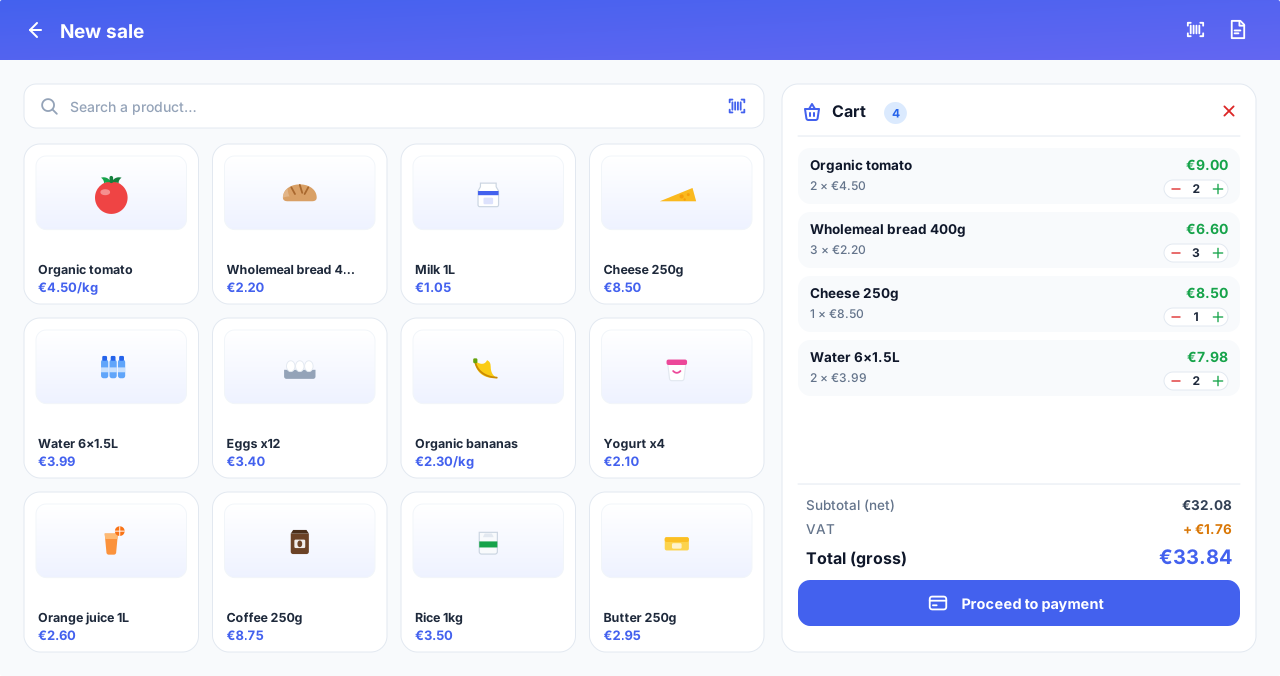
Rush hour, the queue is growing. A few taps are enough to fill the cart, take payment and give change without error, even on a very busy day.
Three resizable areas : categories, products and cart, adjustable to your screen.
Add to cart with highlighting and automatic scrolling to the item.
Payment with up to two methods combined, with change calculation.
Real-time stock check before confirming the payment.
PDF receipt offered and printed after each successful sale.
Sales history filterable, with PDF and CSV export.
Automatic stock update on every payment, and restored on cancellation.
Module 3
Professional invoicing
Compliant documents, computed server-side, ready to be printed or sent.
A business customer asks for a proper invoice. No more typing it by hand at the risk of a VAT error: it comes out in one click, correct and in your name.
Automatic generation of the invoice on payment.
VAT and discounts per item and per sale.
Net / VAT / gross summary clear and exact.
Automatic numbering with a custom prefix.
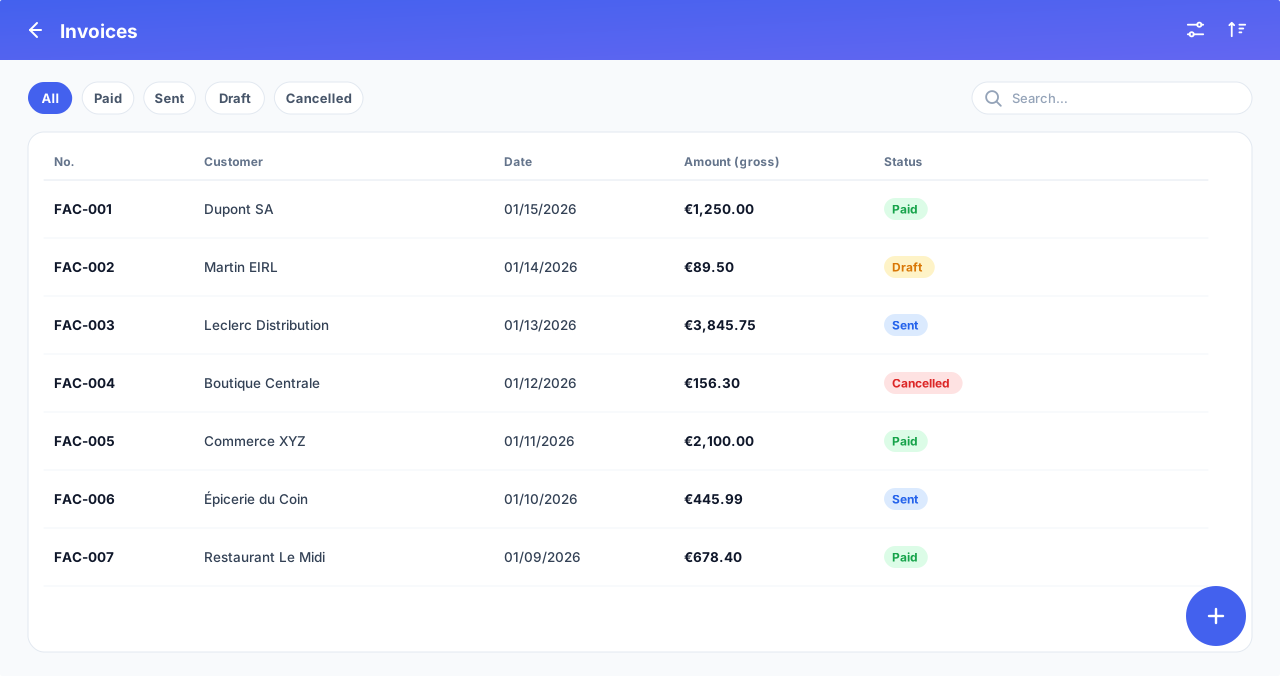
List and detail of invoices with filtering by status.
Printing, sending and cancellation of invoices.
Complete header : logo, contact details, invoice footer, terms and bank details.
Module 4
Quotes and sales proposals
Price an offer, hand your customer a clean document, then turn it into a sale in a single click - without re-entering anything.
A customer hesitates and wants a price in writing. You hand them a clean quote in two minutes; if they say yes, it becomes a completed sale in one click, with nothing to retype.
Create a quote from the checkout, without taking payment or touching the stock.
Professional PDF to print, send or share - ready to hand to the customer.
One-click conversion to a sale, with immediate payment.
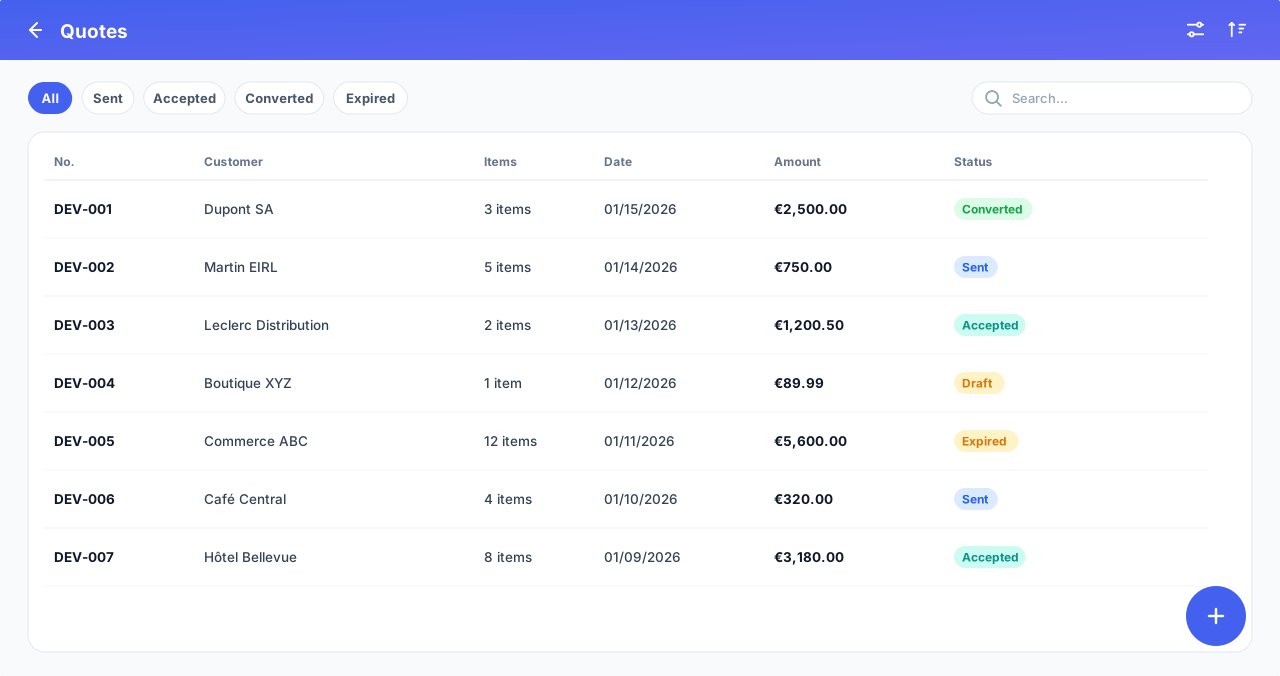
Quote number dedicated, with a validity date.
Clear statuses (draft, sent, accepted, converted); a converted quote is locked.
Net / VAT / gross calculation and discounts, identical to the invoice.
Module 5
Sending documents by email
Send the invoice or quote directly to the customer by email, in one click. No more paper, no more waiting: everything is digital.
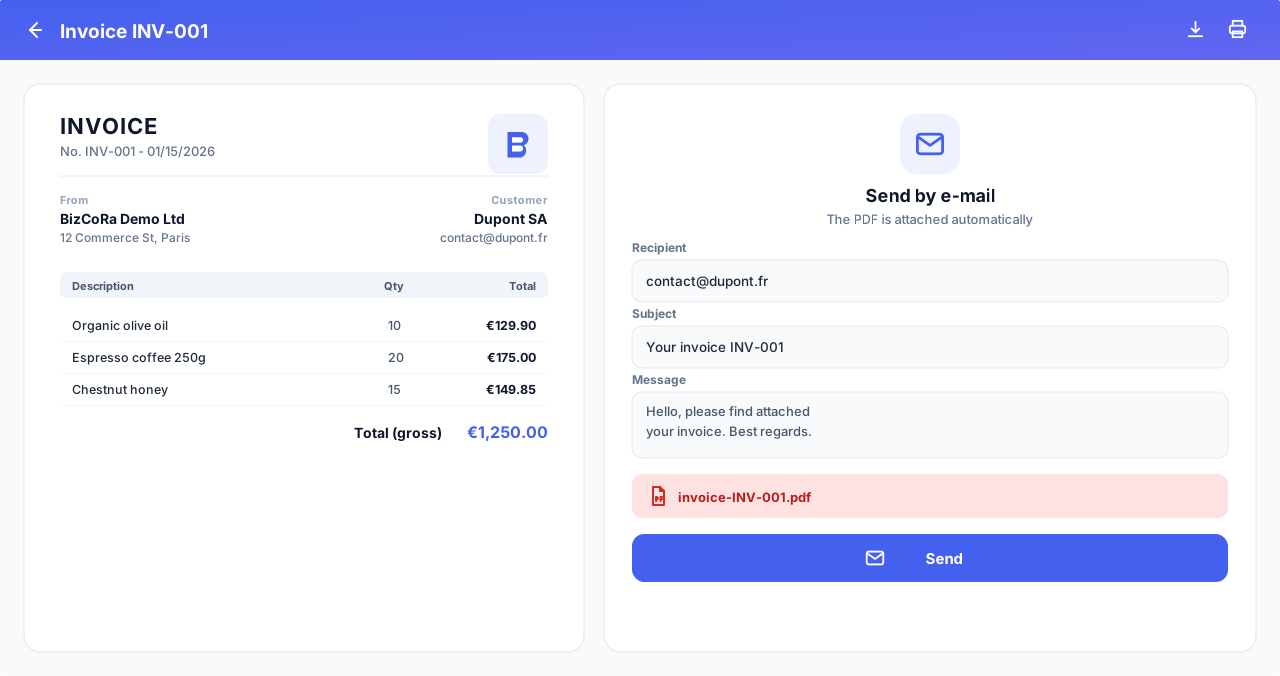
The customer has already left and asks again for their invoice. Instead of reprinting it and chasing after them, you email it to them, right away, from the app.
Invoice and quote sent by email to the customer, with the professional PDF in their name.
Directly from the checkout, a sale's detail or the document screen - without switching windows.
Reliable, non-blocking delivery : automatic retry on a network drop, the email is never lost.
Dedicated email configuration per environment, ready for a professional provider (high deliverability).
Inventory alerts and password resets also by email, in your company's branding.
Module 6
Customer loyalty programme
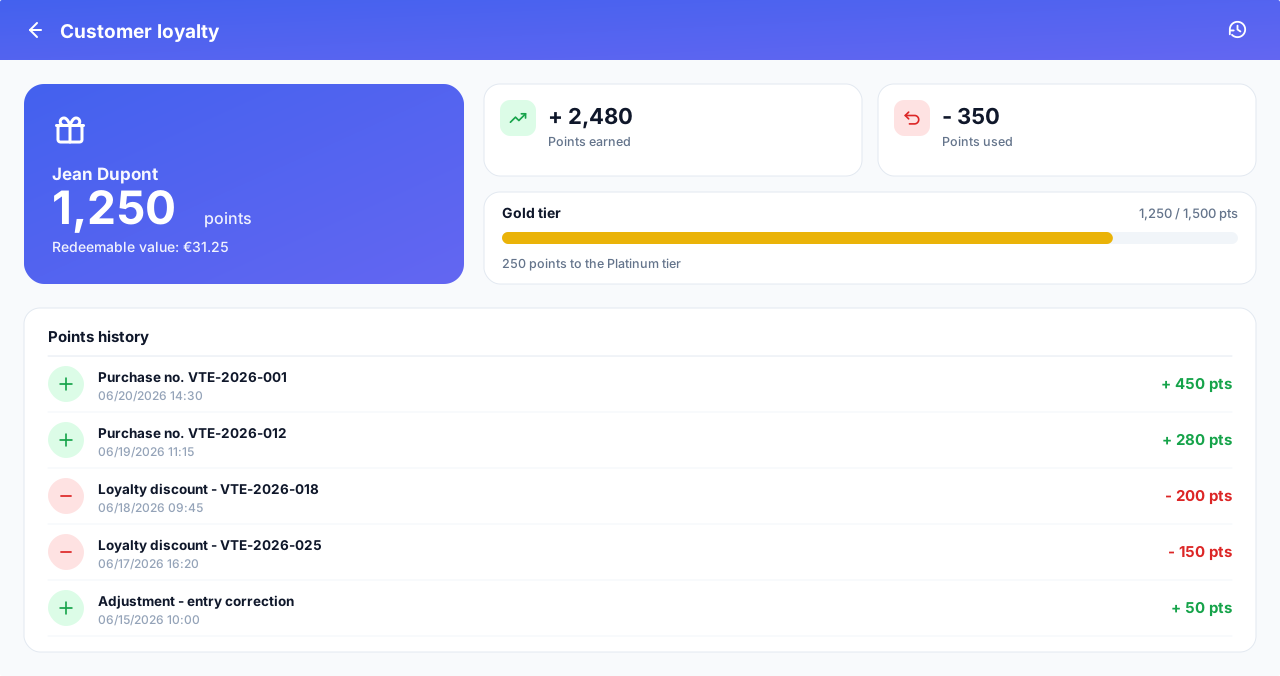
Turn a one-off purchase into a lasting relationship: your customers earn points and use them as a discount. Just like the biggest brands.
Your loyal customer comes back every week. Her points add up by themselves and give her a real reason to return to you rather than to the shop across the street.
Points on every purchase, added automatically to the customer's record.
Points redeemable as a discount right at the moment of sale.
Balance and history visible on the customer record (earnings and redemptions).
Fully configurable per company: earning rate, value of a point, minimum to redeem.
Multi-currency : the point value is expressed in your currency (EUR, FCFA, USD...).
Optional : enable it if you wish. When disabled, it is completely invisible.
Module 7
Real-time alerts and notifications
Never be caught out by a stockout again. The app warns you at the right time.
Your best seller runs out on a Saturday, and every stockout is a lost sale. The app warns you before the shelf is empty, so you can order in time.
Configurable thresholds
Warning threshold (orange) and critical threshold (red)
Global thresholds per company or specific per product
Smart defaults if nothing is set
Real time
Instant in-app notifications for admins and managers
Inventory out banner and pulsing alert cards
Notification filters by type (stock, system)
Emails and preferences
Email alert on critical stock
Three alert types: critical, low, daily summary
Each user chooses whether or not to receive emails
Module 8
Dashboards and reports
Turn your data into decisions. Clear charts and precise indicators, from the day to the year.
At month-end, the real question: did it work? At a glance, you see your best sales and how your revenue is trending, without lining up a single figure by hand.
Today's summary : revenue, number of sales and products out of stock.
Sales trend curve : a trend chart to visualise activity over time.
Top products sold (5, 10, 20 or 50) by day, week, month, quarter, half-year, year or custom period.
Revenue growth compared with the previous month, expressed as a percentage.
Breakdown chart (pie) of stock by category.
Inventory movement chart : inbound and outbound over today, 7 days and 30 days.
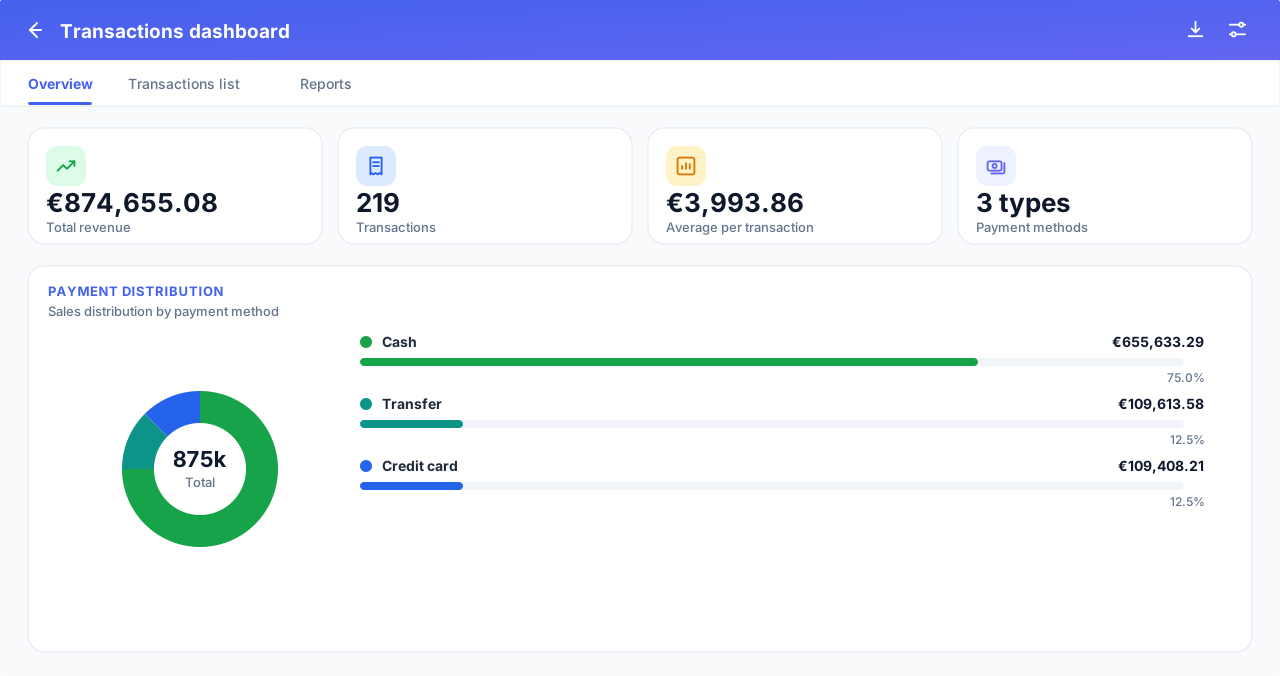
Transactions dashboard with tabs: overview, list and reports.
Inventory report : stock value by category, stockouts and alerts.
Clickable KPI cards that lead straight to the relevant screen.
PDF and CSV export of sales, movements and inventory.
Module 9
Purchasing and suppliers
Record your purchases and your goods receipts. The cost actually paid feeds your stock and your accounting, with no double entry and no guesswork.
The supplier delivers and hands you their invoice. You record it once: stock rises, the real cost is taken into account and your deductible VAT is already counted.
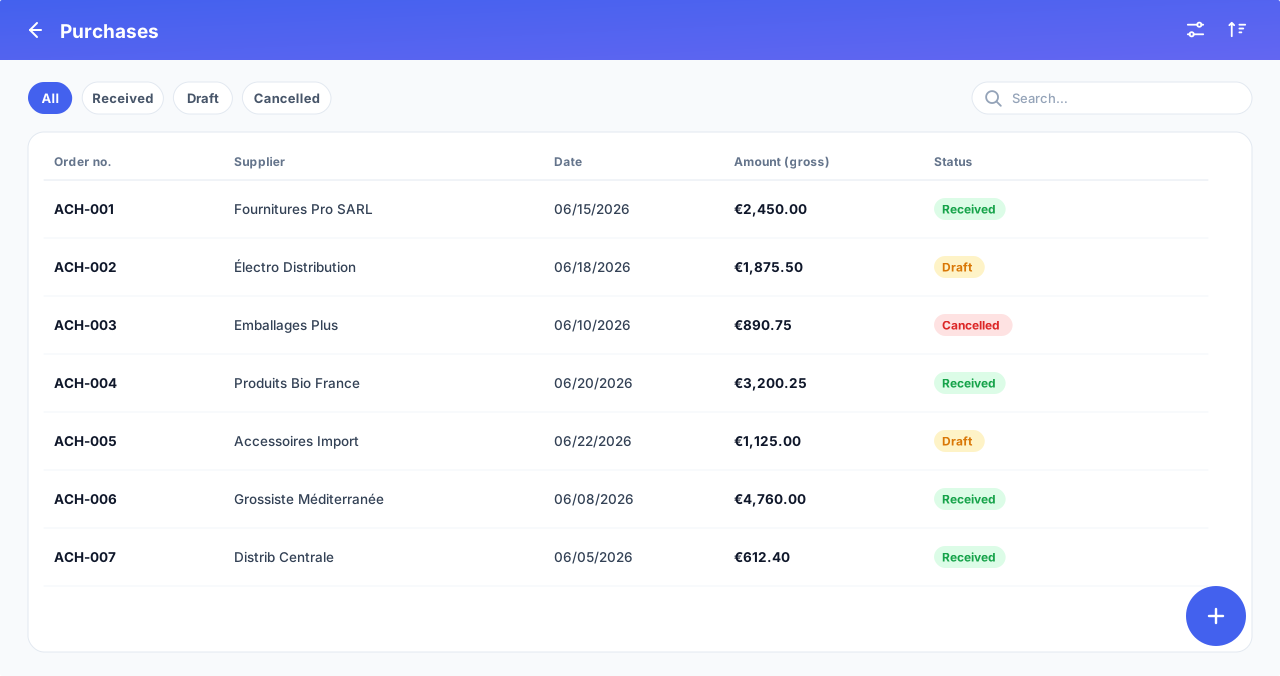
Supplier file complete: create, edit, activate and deactivate, with server-side search and filters.
Purchase documents (goods receipt or supplier invoice) : choice of supplier and product lines with quantity, real cost and VAT.
Real cost captured at source : each purchase updates the product's weighted average cost. No more approximate purchase prices.
Deductible VAT recorded automatically, so you know the VAT actually due (collected minus deductible).
Inventory entries generated on receipt: stock and its value stay accurate at all times.
Supplier reference, date, currency and notes ; totals computed server-side, never on the client device.
Module 10
Accounting and financial steering
A genuine financial dashboard, computed server-side to the cent. Profit, VAT and cash flow over the period of your choice, ready to export.
Your accountant asks for your figures. Instead of spending the weekend on it, you produce the period's profit, VAT and cash flow in one click, accurate to the cent.
Financial dashboard
Net revenue, gross margin and cost of sales
VAT due, net cash flow and stock value at cost
Indicators shown immediately, data loaded in the background
Income statement
Net revenue, cost of sales, gross margin and margin rate
Gross receipts: gross revenue, credit notes, net revenue, collected VAT
Clear distinction between net profit and gross receipts
VAT
VAT collected, deductible and due, correctly signed
VAT credit detected when deductible exceeds collected
Breakdown by rate: net base, collected, deductible, due
Cash flow
Inflows, outflows and net balance over the period
Breakdown by payment method (cash, card, transfer, mobile)
Filters and periods
Periods of day, week, month, quarter, year or custom
Comparison with the previous period, variation as a percentage
Full (annual) report in a single document: profit, VAT, cash flow
Legal identity (company name, registration, VAT number, capital) and a unique document number
Weighted average cost method (compliant with international standards), amounts calculated exactly, configurable fiscal year and multi-rate VAT. Module restricted to administrators and managers.
Module 11
Your company, your identity
BizCoRa adapts to your brand and your business rules, not the other way around.
You want your documents to look like you. Logo, colours, currency and language: the app carries your identity, not that of some anonymous software.
Visual identity
Company logo (JPEG, PNG, WEBP)
Primary and secondary colours
Full company contact details
Invoicing and currency
Currency (EUR, USD, XAF, XOF and more)
Default VAT rate and invoice prefix
Invoice footer, payment terms, bank details
Language and timezone
Interface in French, English and German
Timezone and locale per company
Dark mode and light mode
Profile and account
Profile screen for each user
Profile photo per user (or initials by default), shown in the app
Biometric sign-in (fingerprint, Face ID, Windows Hello)
Password reset by email
Deactivation and reactivation of accounts
Module 12
Tailored roles and permissions
Three ready-to-use roles (administrator, manager, cashier) and, above all, tailored per-user rights : grant or revoke a specific permission for a person, beyond their role. Everything is verified server-side.
You trust one manager to edit products, but not the others; you allow a specific cashier to issue refunds. In two clicks, each person has exactly the rights you decide - no more, no less.
Capability
Administrator
Manager
Cashier
Take payment for sales
View the catalogue
Manage stock and movements
No
View reports and invoices
No
Receive stock alerts
No
Manage users
No
No
Configure the company and invoicing
No
No
Beyond roles: fine-grained rights, person by person
Roles are only a starting point. The administrator then adjusts each user individually.
Grant or revoke a right
Give a person a right their role doesn't have (e.g. a manager who can edit or delete products).
Or remove a right the role has by default (e.g. a cashier who can no longer issue refunds).
The change affects only that person, never the others with the same role.
A clear matrix by module
Rights grouped by module: Products, Sales, Inventory, Customers, Invoices, Purchasing, Reports, Accounting, Users...
One checkbox per action (view, create, edit, delete, refund...). Tick it, it's applied.
Each right shows whether it is already included by default in the role.
Safe, traced, no lock-out
Always verified server-side : impossible to bypass from the app.
Anti-lock-out : an administrator always keeps control (you can't remove management from the last admin).
Every change to rights is recorded in the audit log.
A dedicated Superadmin console also lets you manage all the companies on the platform.
Module 13
Cashier performance
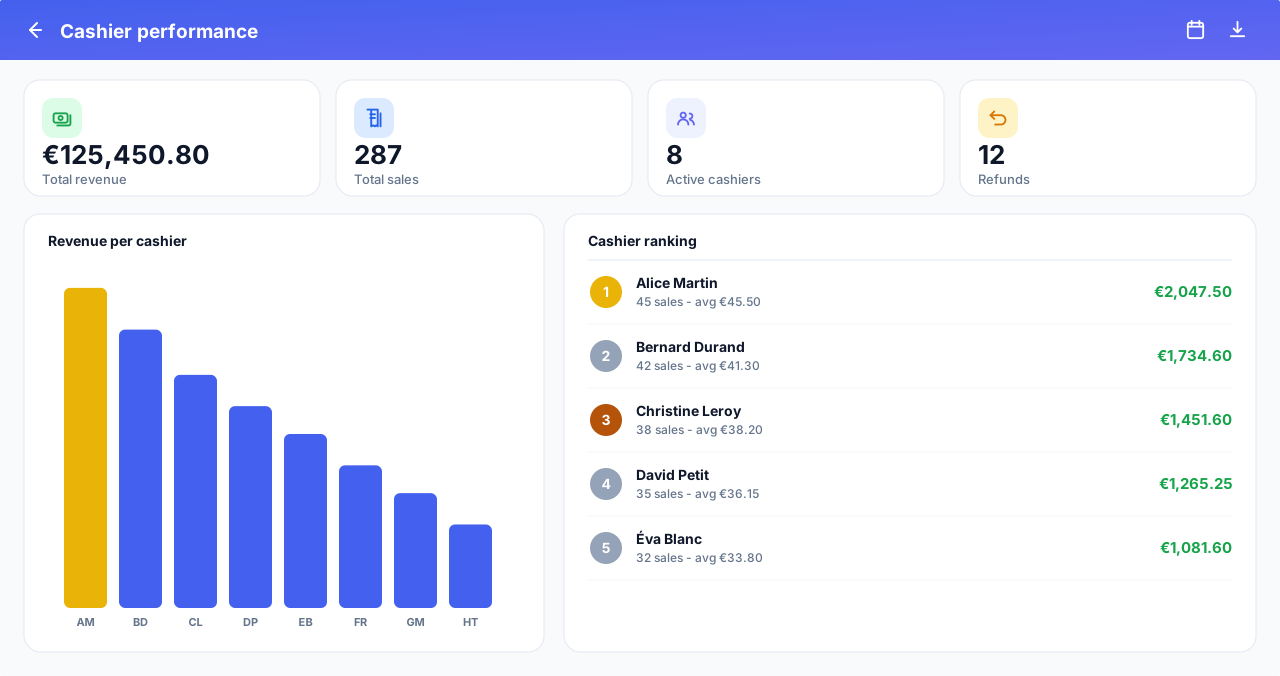
Know who sells the most and reward your best people. Compare and rank your cashiers over any period you choose.
End of the day: who sold the most? Instead of digging through receipts, the ranking is already there on screen - perfect to motivate the team and spot who needs a hand.
Cashier ranking, from top to bottom performer.
Sort by revenue or by number of sales, in one click.
Period totals: revenue, number of sales, active cashiers and refunds.
Chart of revenue (or sales) per cashier to compare at a glance.
Freely chosen period: today, week, month or custom range.
Server-side calculations, fast and reliable even on large volumes, restricted to authorized profiles.
Module 14
Barcode scanning (scanner gun)
Check out and find your products at lightning speed, with a simple barcode scanner.
The customer puts ten items on the counter. You scan them one by one: each product drops into the cart on its own, no searching, no typing. The queue keeps moving.
Scan to check out
Scanning a product instantly adds it to the cart at checkout
Fast scanner bursts are handled without errors
Fewer input mistakes, faster-moving queues
Find a product
Scan within a list to identify an item instantly
Check a product's stock and price in a single scan
No more fumbling through the catalog
Multiple codes, a real scanner
Several barcodes per product (formats or pack sizes)
Compatible with common USB and Bluetooth scanner guns
Global capture: no field to click before scanning
Module 15
Built-in help center
A complete in-app guide: your teams become self-sufficient, without costly training.
New cashier, first day. Instead of interrupting you every five minutes, they open the built-in guide and find, step by step, exactly what to do.
Help tailored to each role
Each user sees the help for their scope (cashier, manager, admin)
Nothing irrelevant: only what concerns the person is shown
Available in French, English and German
Instant search
Type a keyword, find the right article immediately
Articles grouped by category for easy browsing
An answer in seconds, without leaving the app
Built for beginners
Step-by-step procedures: where to click, what to enter, how to check
Concrete examples and error messages explained (cause + fix)
Always up to date: the guide follows the app as it evolves
Module 16
Security, reliability and technology
A solid technical foundation to protect your data and support your growth.
Your data is years of work. It stays strictly yours, isolated from other companies, protected and traced, whatever happens.
Watertight multi-company
Data strictly partitioned per company. No leakage possible between customers.
Token authentication
Secure token-based sign-in and permissions verified on every sensitive action.
Audit log
Sign-ins, creations, edits and stock movements are traced and timestamped.
Protected passwords
Hashed passwords, one-time reset codes and rate-limited attempts.
Multi-platform
Mobile, desktop and web from a single codebase, for an identical experience everywhere.
Microservices architecture
Independent services for authentication, inventory and sales: reliability and scalability.
Biometric sign-in
Fingerprint, Face ID or Windows Hello: fast, secure sign-in after an initial password authentication.
Reliable real-time notifications
Instant alerts over a secure channel (token outside the URL), with automatic reconnection: no notification is lost.
Have a feature in mind? Let's look at it together
Start your 14-day free trial, no card required. Specific needs, questions or concerns? Our team is happy to help.